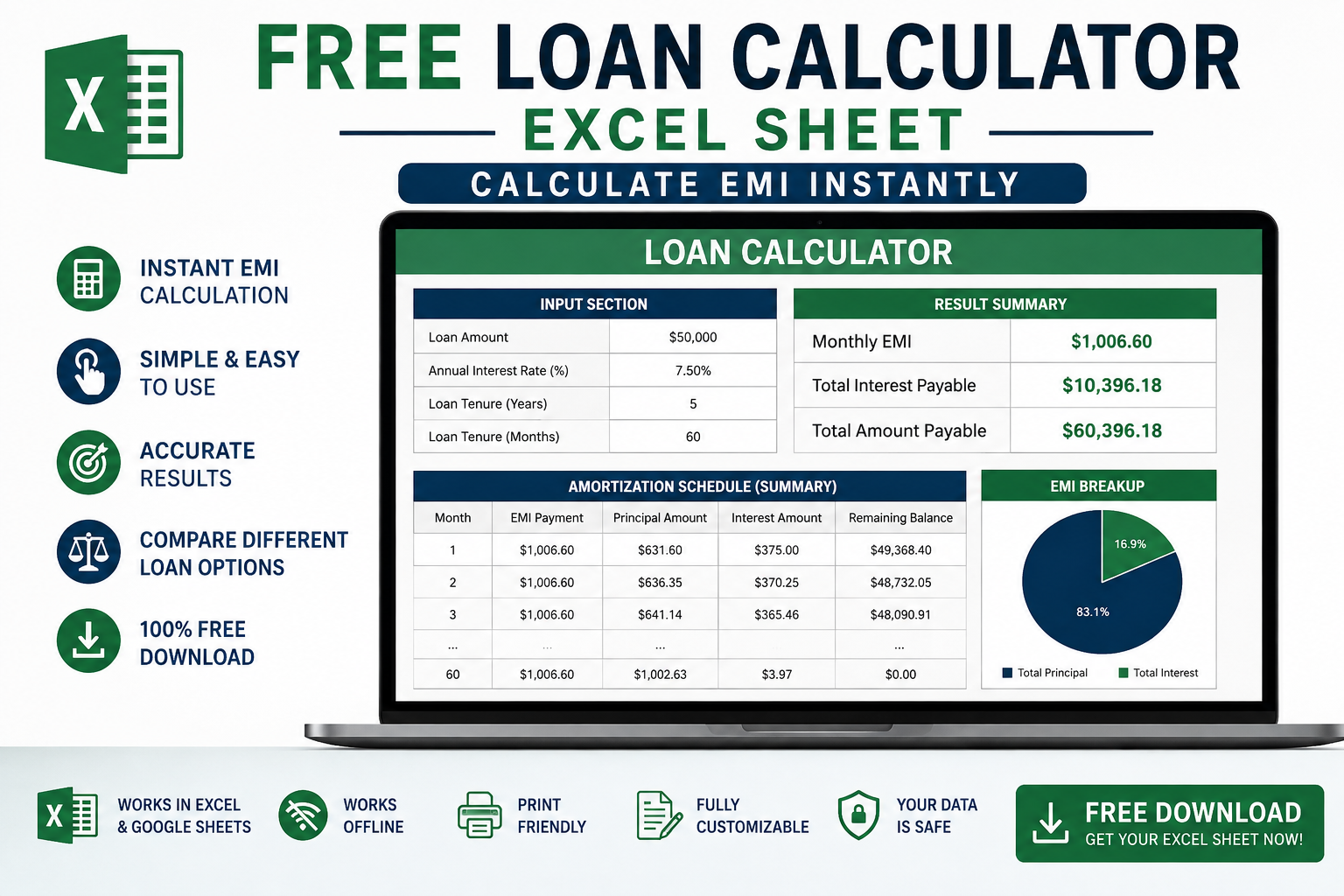
Looking for an easy way to calculate your loan payments? Download our Free Loan Calculator Excel Sheet and get instant results.
This free template helps you calculate EMI, total interest, and total payment amount in just seconds. Just enter your loan amount, interest rate, and loan tenure. The sheet will automatically show you monthly EMI and full amortization schedule.
Perfect for home loan, personal loan, car loan or student loan planning. No signup required. 100% free download.
What’s Inside This Excel Sheet:
- Automatic EMI Calculation
- Total Interest Paid
- Loan Amortization Table
- Works on Excel, Google Sheets & Mobile
Managing a loan becomes much easier when you know exactly how much you need to pay every month. A Free Loan Calculator Excel Sheet is a simple and effective tool that helps you calculate your Equated Monthly Installment (EMI) instantly. Whether you’re planning a home loan, car loan, personal loan, education loan, or business loan, this Excel calculator allows you to estimate your monthly payments with just a few inputs.
In this guide, you’ll learn how a loan calculator works, its benefits, and why an Excel-based calculator is one of the best tools for financial planning.
Table of Contents
What Is a Loan Calculator Excel Sheet?
A Loan Calculator Excel Sheet is a spreadsheet that automatically calculates your monthly EMI based on:
- Loan Amount
- Interest Rate
- Loan Tenure (Months or Years)
Using built-in Excel formulas such as PMT, the calculator instantly provides accurate repayment details without requiring any manual calculations.
What Is EMI?
EMI stands for Equated Monthly Installment. It is the fixed amount you pay every month until your loan is completely repaid.
Each EMI includes:
- Principal Amount
- Interest Amount
As your loan progresses, the interest portion gradually decreases while the principal repayment increases.
Features of the Free Loan Calculator Excel Sheet
Our free Excel loan calculator includes:
- Instant EMI calculation
- Easy-to-use interface
- Supports monthly and yearly loan terms
- Calculates total interest payable
- Shows total repayment amount
- Printable format
- Works offline
- Compatible with Microsoft Excel and Google Sheets
Benefits of Using an Excel Loan Calculator
1. Saves Time
Instead of calculating loan payments manually, simply enter your loan details and receive instant results.
2. Better Financial Planning
Knowing your monthly EMI helps you prepare your budget before taking a loan.
3. Compare Different Loans
Try different:
- Interest rates
- Loan amounts
- Loan durations
to find the most affordable option.
4. No Internet Required
Unlike online calculators, Excel works completely offline.
5. Free to Use
Download once and use it forever without paying any subscription.
How to Use the Loan Calculator
Using the calculator is simple.
Step 1
Enter your Loan Amount.
Example:
$20,000
Step 2
Enter the Annual Interest Rate.
Example:
8%
Step 3
Enter the Loan Tenure.
Example:
60 Months
Step 4
The calculator automatically displays:
- Monthly EMI
- Total Interest
- Total Amount Payable
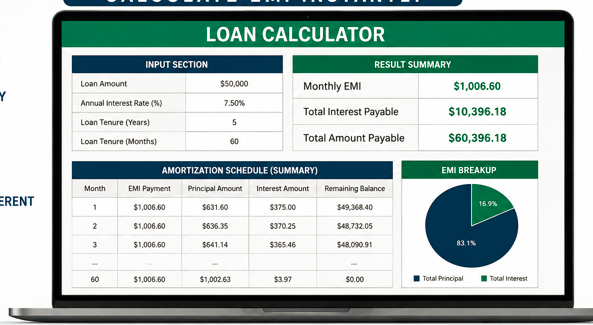
Example EMI Calculation
Suppose you borrow:
- Loan Amount: $50,000
- Interest Rate: 7.5%
- Loan Term: 5 Years
The calculator instantly estimates your monthly EMI along with the total repayment cost.
Who Can Use This Calculator?
This Excel sheet is ideal for:
- Students
- Salaried Employees
- Freelancers
- Small Business Owners
- Home Buyers
- Car Buyers
- Financial Advisors
- Loan Consultants
Types of Loans You Can Calculate
This calculator supports almost every type of loan, including:
- Personal Loan
- Home Loan
- Mortgage Loan
- Car Loan
- Education Loan
- Student Loan
- Business Loan
- Gold Loan
- Motorcycle Loan
- Construction Loan

Why Choose an Excel Loan Calculator Instead of an Online Calculator?
Excel calculators provide several advantages:
- No internet required
- Easy customization
- Save multiple loan scenarios
- Printable reports
- Better privacy since your data stays on your computer
Tips Before Taking a Loan
Before applying for any loan:
- Compare interest rates from different lenders.
- Borrow only what you actually need.
- Choose a loan tenure that fits your monthly budget.
- Check for hidden processing fees.
- Read the loan agreement carefully.
Frequently Asked Questions (FAQs)
Is this Loan Calculator Excel Sheet free?
Yes. You can download and use it completely free.
Can I calculate a home loan?
Yes. It works for home loans, personal loans, car loans, education loans, and more.
Does it work in Google Sheets?
Yes. Most Excel loan calculators are compatible with Google Sheets.
Can I customize the calculator?
Yes. Since it’s an Excel file, you can edit formulas, colors, and layouts according to your needs.
Is the EMI calculation accurate?
Yes. It uses Excel’s financial formulas to calculate EMI accurately based on the information you provide.
Final Thoughts
A Free Loan Calculator Excel Sheet is an essential financial planning tool for anyone considering a loan. It simplifies EMI calculations, helps compare loan options, and allows you to make informed borrowing decisions. Whether you’re financing a new home, purchasing a car, or applying for a personal loan, this spreadsheet can save time and help you stay in control of your finances.